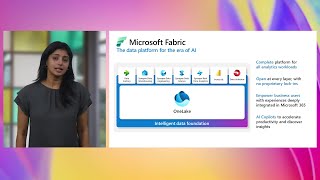
Fabric security: everything you need to know!

summary
Fabric encrypts data at rest and enforces TLS 1.2 in transit and uses encrypted by default storage for OneLake, but customer‑managed keys are not yet available. Authentication is through Entra ID + conditional access with MFA, device signals and anomaly detection; Zero‑Trust is the recommended pattern. Network options include private links (cuts service off from public internet, adds ExpressRoute cost and product limitations) or built‑in Microsoft backbone for outbound traffic. Recent additions: trusted workspace shortcuts to private ADLS, Direct Lake behavior workarounds, auditing APIs and Purview lineage; file/folder roles are rolling out soon.
AI-written summary · about
chapters (13)
- 0:00Introduction to Microsoft Fabric
- 2:25Fabric as a SaaS platform
- 4:29Modern data security challenges
- 9:04Simplified network security
- 10:14Architecture and connectivity
- 12:38Authentication and access
- 18:24Private links and networking
- 21:53Secure data ingestion
- 23:40Encryption in Fabric
- 25:13Fine-grained security
- 32:12Data residency and compliance
- 34:55Administration and governance
- 45:10Closing and Q&A
related talks
 30mSecure govern and manage your data at scale in Fabric
 32mDesigning secure Azure SQL Database solutions
 40mUnderstanding the cryptographic controls in Azure SQL Database
 12mSecurity data gravity: Visibility & threat detection for data lakes
 38mBuilding a secure data solution using Azure Data Lake
 53mAchieving End-to-end Security on AWS
 48mProtecting the confidentiality and integrity of your high value data with Azure SQL and SQL Server 2
 28mSecuring Multi-Cloud and Hybrid Environments