Qt Apps with Nokia - Design, Develop, Distribute 3/7 - Overview (continued)
summary
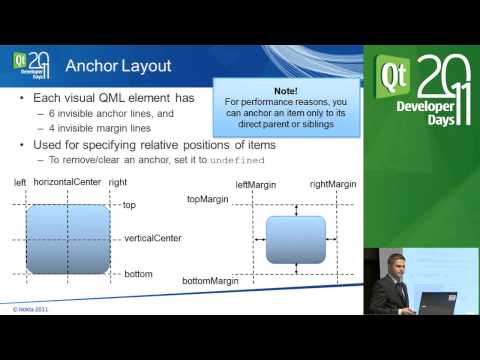
Quick hands‑on with QML showing a working UI: a root Rectangle with import qt quick 1.0, Text, Image and a MouseArea wired to MouseArea onClicked that uses console.log. Demonstrates anchoring and margins for responsive layout, differences between positioners (Row/Column/Grid) and layouts, and that positioners only manage x/y so items need explicit sizes. Notes Qt 4.7 device compatibility and Qt Quick Compact on N900 to fake the 1.0 module.
AI-written summary · about
chapters (11)
- 0:00Start
- 3:03built-in basic elements
- 7:46instantiating this text element
- 9:20lay out your elements
- 10:01anchor these elements to each other
- 10:45set up a margin
- 13:13put them in a row or column
- 14:26put your elements in a grid
- 14:53specify the number of rows
- 15:23adding items inside the layout
- 18:44modifying the accepted buttons
related talks
 25mBest Practices for using QML and QtQuick
 23mQt Quick : Don't make these mistakes!
 01h 00mQt for MCUs – A Deep Dive
 27mSet Yourself up for Success — Lessons Learned from Building 100+ Devices with C++/Qt/QML
 35mQtinUse - UI & System Design Challenges for the NxG Lighting Tool
 58mQt for Device Creation
 49mHow to scale QML based projects an Architecture vision
 18mHow we stopped using the mouse and started drawing molecules with...