Demystifying the APCA Advanced Perceptual Contrast Algorithm

summary
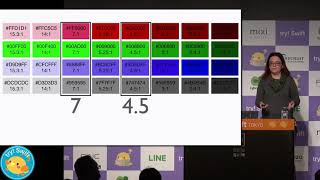
APCA replaces contrast ratios with a lightness contrast (LC) scale running -108 to 106 and five actionable thresholds (LC 90, 75, 60, 45, 30) that tie specific minimum font sizes to font weights, so many current 4.5/7:1 pairings fail unless text is enlarged or bolded (examples: 12px → 40px or 24px → 106px in some cases; 16px can require ~21px equivalent). A working tool integrates the APCA Calculator API into a Figma Contrast It plugin (internal beta) to compute required LC, weight, and minimum size.
AI-written summary · about
chapters (8)
- 0:00Introduction and context
- 3:04Current contrast standards
- 7:49APCA impact on design
- 13:08Demystifying the APCA
- 22:21Calculating font requirements
- 25:53Deep dive into data graphs
- 34:01Figma plugin demonstration
- 38:13Q&A session
related talks
 16mColor Contrast for Accessibility
 56mTypographer vs. Accessibility
 06mDesign Accessibly: Color Contrast Tips and Tools
 44mError 404: Color Not found
 40mYou can’t read this sentence - A11y automation
 11mThis 1 simple 600-year-old trick makes your website more accessible!
 15mThe Magic of Accessibility in Color Perception
 39mTypographer vs. Accessibility