Debugging and Profiling .NET Core Apps on Linux
summary
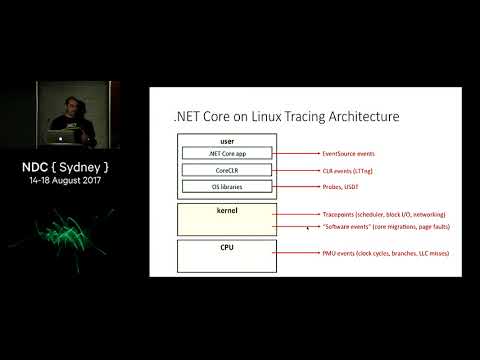
Shows how to profile .NET Core on Linux using actual tools and steps: use perf record -F 97 to sample CPU (example run captured 720 samples), enable JIT symbols with COMPlus_PerfMapEnabled=1 to get managed names, convert perf output to flame graphs to spot heavy GC and allocation hot paths, or use BPF/BCC for lower overhead continuous monitoring. For runtime events use LTTNG and analyze core dumps with lldb 3.6 plus SOS to extract managed stacks and the original exception.
AI-written summary · about
chapters (20)
- 0:00Start
- 2:02The Plan
- 4:22Tools And Operating Systems Supported
- 5:57Mind The Overhead
- 7:40Sampling vs. Tracing
- 9:30NET Core on Linux Tracing Architecture
- 14:05The Official Story: perfcollect and PerfView
- 18:23perf_events Architecture
- 19:54Five Things That Will Happen To You If You Don't Have Symbolic Debug Information
- 21:29Getting Debug Information
- 25:13Flame Graphs
- 25:59Reading a Flame Graph
- 33:40The Old Way And The New Way: BPF
- 36:37The BCC BPF Front-End
- 50:50Generating Core Dumps
- 51:53Analyzing .NET Core Dumps
- 53:23libsosplugin.so
- 57:19Checklist: Preparing Your Environment
- 57:40Summary
- 58:14References
related talks
 01h 00mWriting a .NET Core cross platform profiler in an hour
 47mSolving .NET performance issues
 56mContinuous Profiling the missing piece in your observability puzzle
 01h 02mThe performance loop—A practical guide to profiling and benchmarking
 26mProfiling Mastery: Decode Your Data and Elevate Observability
 44mObservability Tools C++: Beyond GDB and printf - Tools to Understand the Behavior of Your Program
 53mDebugging .NET Apps
 50mDebugging Node.js in Production