Advanced & Practical MotionLayout
summary
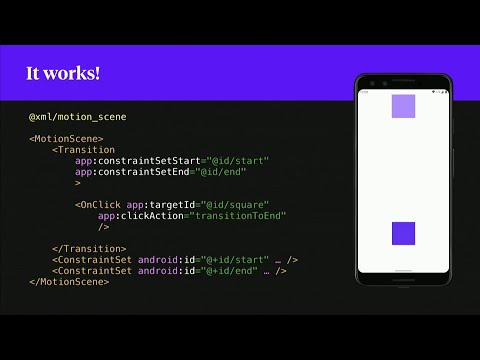
Covers how MotionLayout actually solves common UI problems: shows reuse Constraints between Transitions to avoid duplication, uses drag space touch anchor to implement smooth swipe-to-archive in a RecyclerView, links parent progress into a child MotionLayout to drive collapsing headers, and uses programmatic updateState to zoom any tapped item in a 3x3 grid. Demos work but expose bugs: buggy decelerate interpolator, wrap_content header issue (workaround shown), and fragile autoTransition chaining; uses cubicbezier.com for custom easing.
AI-written summary · about
chapters (21)
- 0:00Introduction to MotionLayout
- 1:05Basic MotionLayout setup
- 4:35OnClick and transitions
- 5:57Interpolators and easing
- 6:59OnSwipe gesture handling
- 8:43Adding intermediate states
- 9:25Sub-elements in MotionLayout
- 15:42Swiping items in RecyclerView
- 18:08Collapsing toolbar basics
- 19:56Nested MotionLayouts
- 22:44Changing text in MotionLayout
- 24:27Visibility control in MotionLayout
- 25:51Programmatic constraint changes
- 27:36RecyclerView and placeholders
- 29:03Fixing wrap height bug
- 31:26Auto transitions and tricks
- 32:47Debugging MotionLayout
- 35:34Practical limitations
- 36:16Progress indicators and more
- 37:40Nested scroll and tab layouts
- 38:02Why use MotionLayout
related talks
 40mAdvanced & Practical MotionLayout
 44mPractical Motion with Constraint Layout
 42mDo the Loco-MotionLayout: Building animations with MotionLayout
 29mBringing your app to life - Motion Animations everywhere
 19mMotionLayout: Animation made easy
 23mMotionLayout & RecyclerView
 44mDo the Loco-MotionLayout: Building animations with MotionLayout
 21mResponsive UI with Constraint and Motion layout