Advanced & Practical MotionLayout

summary
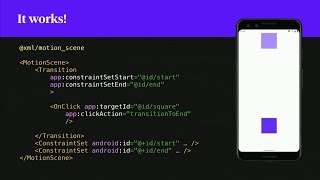
ConstraintLayout 2.0’s MotionLayout is shown as a practical replacement for ad hoc animators: animations live in XML motionScene files, transitions use onClick or onSwipe with touchAnchorSide and onTouchUp modes like autoComplete/onTouchUp, and interpolators include a customizable cubic easing. Keyframe sets support up to 100 keyframes per view. Workarounds cover RecyclerView swipe (no touch anchor vs empty anchor), nested MotionLayouts with motionProgress linking, visibilityMode="ignore", programmatic updateState, placeholders, auto transitions, and shipping use in Hinge onboarding and pixel-matrix image effects.
AI-written summary · about
chapters (21)
- 0:00Introduction to MotionLayout
- 1:15Creating first MotionLayout
- 3:41Adding constraints and states
- 5:28On click gesture basics
- 6:11On swipe gesture explained
- 8:57On touch up and interpolators
- 11:22Adding middle state transitions
- 12:24Sub elements and properties
- 15:12Motion subelement and transforms
- 17:40Keyframe sets for complex animations
- 21:08MotionLayout in RecyclerView
- 23:40Collapsing toolbars with MotionLayout
- 25:27Nested MotionLayout usage
- 27:33Text and visibility handling
- 30:01Changing constraints programmatically
- 31:24RecyclerView placeholders
- 32:29Auto transitions and looping
- 33:52Debugging MotionLayout
- 35:56Challenges and limitations
- 37:42Practical examples and use cases
- 38:44Summary and production insights