Why Running kubelet on your Vacuum Robot is (not) a Good Idea

summary
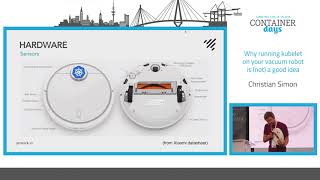
Claim: a Xiaomi Mi Vacuum Robot can act as a Kubernetes node but practical limits make it dubious for production. ARM Cortex‑A7 device (512 MB RAM, 4 GB flash, Linux kernel 3.4, Ubuntu userspace) runs a custom rocklet fake kubelet that posts node status, taints itself, and accepts pod-like commands via the Kubernetes API; uses CronJob scheduling, CRDs and a Prometheus exporter for metrics. Maps and paths are stored as PNG/base64 and SQLite. Prototype works in testing but live demo fails often due to flaky 2.4 GHz Wi‑Fi and old kernel limitations.
AI-written summary · about
chapters (17)
- 0:00Introduction and speaker background
- 1:08Hardware capabilities of vacuum robots
- 5:11Software stack and firmware details
- 8:01Vendor cloud and proprietary protocols
- 11:59Why liberate the vacuum from the cloud
- 13:02Role of Kubernetes in vacuum control
- 14:29Design of the fake kubelet component
- 16:59Scheduling cleaning jobs with CronJobs
- 18:54Remote control via kubectl exec
- 19:36Storing robot status in Kubernetes
- 21:02Handling vacuum map formats
- 22:05Front-end integration with Kubernetes API
- 24:13Metrics and monitoring approach
- 24:37Demo attempt and Wi-Fi issues
- 26:53Live demo of Kubernetes integration
- 30:53Lessons learned and future improvements
- 32:59Conclusion and Q&A
related talks
 31mWhy running kubelet on your vacuum robot is (not) a good idea
 37mGoing Beyond the Node – Using VK to Realize Crazy Ideas
 27mKubernetes The Fun Way
 36mIntro: Virtual Kubelet
 43mMaking Running Virtual Machines in a Kubernetes Cluster a Mainstream Activity
 47mMinikube
 32mKubeVirt - making running virtual machines in a k8s cluster
 05mDesigning Kubernetes Clusters That Run on Embedded Devices