Connect remotely like a pro! Hack VPNs, avoid firewalls, connect even when your machine is down

summary
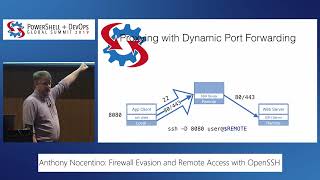
Five live demos show practical ways to reach a corporate machine: SSH port forwarding and a SOCKS proxy to browse via office; link aggregation with a multiplexer keeps one SSH session alive across 3–4 cellular/Wi‑Fi links; TCP over ICMP (ping) and TCP over DNS proxies work when captive portals block TCP; Intel AMT exposes a CPU‑level VNC and remote power control (demo uses port 8010) and sslh hijacks SSH on port 443 to escape full‑tunnel VPNs — all demos run successfully.
AI-written summary · about
chapters (13)
- 0:00Introduction
- 5:20Remote corporate access
- 11:21Split vs full tunnel VPNs
- 14:55Reliable travel internet
- 21:16Bypassing Wi-Fi firewalls
- 24:34Dead machine rescue with AMT
- 30:56SSLH and VM escape
- 38:28Ditch corporate laptop
- 41:22TCP over filesystems
- 45:17Chaining VPNs with VMs
- 48:08Audio/video calls remotely
- 53:50Remote work tips
- 58:27Q&A
related talks
 43mFirewall Evasion and Remote Access with OpenSSH
 35m"How to hijack, proxy and smuggle sockets with Rack/Ruby"
 33mRemote Access to IoT Devices: Common Needs & Approaches
 47mMinimum Viable Linux
 52mWi-Fi Hacking for Web Pentesters
 11mRethinking Remote Access in a Remote First World
 53mHow hacking works - Web edition
 41mModding Security & Privacy