Considering Accessible HTML Forms, JavaScript & WAI-ARIA

summary
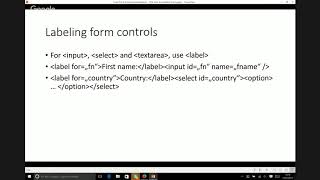
Practical checklist for accessible, multi-step HTML forms: use HTML5 semantic inputs as the core, minimize custom widgets, and prefer native focusable elements over tabindex>0. Associate labels with inputs (explicit id/for or wrapped labels), mark errors with aria-invalid and aria-describedby, and provide an error summary with links that set focus. Use live regions (role=status for noninterruptive, role=alert sparingly) and plan focus movement; a survey shows dynamic changes are the #2 usability problem and only ~8.4% of pages use fieldset while ~2% include a legend.
AI-written summary · about
chapters (14)
- 0:00Intro
- 2:03HTML 3.2 Reference Specification
- 3:39WebAIM Survey of Screen Reader Users
- 5:57Start with the flow of the app, each state may have its own issues
- 9:18Define the focus order, are there unique interactions to define
- 18:23Labels & Buttons
- 21:46Labels & Inputs & Buttons
- 23:37Side Note
- 30:04Rely on HTML Elements
- 30:31Develop a Plan Keyboard Users
- 34:26Develop a Plan for Keyboard Users
- 36:26Plan for Giving the User an Update
- 41:00Start With Prevention
- 43:10Help Users Correct
related talks
 01h 07mInclusive Design Series: How to stop worrying and love accessible forms
 50mStructuring Accessible Forms
 18mInput Accessibility Deep Dive
 31mAccessible Forms: It's Not as Difficult as You Think
 48mThe Web Accessibility Basics
 28mAccessible Forms
 47mBuilding Accessible Web Components
 45mA Web for Anyone, Anywhere, Anytime