Applied TensorFlow in Android apps

summary
Hands‑on guide to running TensorFlow models on Android: use cloud Vision/Natural Language APIs, drop a pre‑trained graph.pb into an app via the Java InferenceInterface and JNI/NDK, or retrain/transfer‑learn with Docker and TensorBoard inspection. Examples: MNIST training reaches high‑90s% after ~200k iterations; reinforcement cart‑pole learns in ~1 hour real time (~10 CPU hours); Inception mobile model is ~90 MB (digit model ~13 MB); retraining Inception on ~120 images takes ~20 minutes on a laptop and uses strip_unused to reduce ops.
AI-written summary · about
chapters (19)
- 0:00Introduction to talk
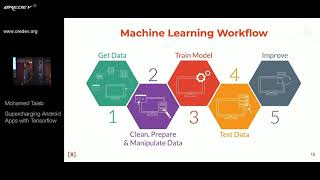
- 1:59Machine learning basics
- 7:34TensorFlow overview
- 9:00ML integration levels
- 10:03Cloud APIs in Android
- 11:49Pre-trained model demo
- 13:11Android app architecture
- 15:44TensorFlow inference interface
- 18:10TensorBoard for models
- 20:37Model configuration values
- 22:00Setting up TensorFlow
- 23:04Training MNIST model
- 25:12Customizing models
- 26:58Inception model details
- 27:41Retraining with new data
- 29:30Model optimization tools
- 31:33Testing retrained model
- 32:57Key takeaways and resources
- 35:19Q&A session
related talks
 31mSupercharging Android Apps with Tensorflow
 19mOn-device machine learning: TensorFlow on Android
 39mMachine Learning on Android Demystified
 39mAI/ML on mobile/android with TensorFlow
 43mTensorFlow for Mobile Developers
 29mFrom TensorFlow to ML Kit: power your Android application with ML
 47mMachine Learning on Android Demystified
 33mWho’s Afraid of Machine Learning? First Steps with TensorFlow for Android