Re-Compose your UI: building an atomic design library

summary
Concrete claim: Jetpack Compose implements a scalable, reusable design system by decomposing UI into atomic components and templates. The session shows actual component code paths — custom text atoms, a card molecule, a lazy column organism and a model bottom sheet layout template — and explains screen‑level state ownership that triggers recomposition. It names tradeoffs (onboarding and maintenance cost) and provides evidence the Compose design library at Telepass Digital is built, migrated into production, and simplifies reuse across app views.
AI-written summary · about
chapters (17)
- 0:00Atomic design in mobile apps
- 1:33Atomic design theory
- 5:51Architecture guidelines
- 8:15Component hierarchy
- 10:03Advantages and trade-offs of atomic design
- 13:13Atoms molecules organisms templates
- 16:25Atomic design in Jetpack Compose
- 20:21Why Jetpack Compose fits
- 21:44Bottom sheet component
- 26:16Q&A on migrating
- 28:27Traditional UI limits
- 29:30Declarative vs imperative
- 31:57State handling in Compose
- 34:26New Compose design library
- 36:13Library structure synergy
- 38:00Theming and consistency
- 39:02Closing remarks
related talks
 38mDesigning scalable Compose APIs
 31mDesigning Media Friendly Jetpack Compose Components
 41mImplementing a Design System in Compose
 45mHow We Built a Design System in Jetpack Compose
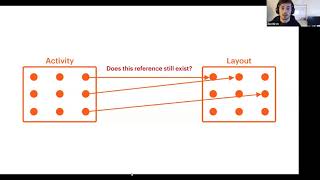 40mRethinking UI: Imperative to Declarative
 49mImplement your own design system with Jetpack Compose
 01h 00mJetpack Compose - Next Gen Kotlin UI Toolkit for Android
 40mMaking Large Screens Easier in Compose