Learn How to Run an LLM Inference Performance Benchmark on NVIDIA GPUs

summary
Step‑by‑step recipe shows a repeatable Fedora workflow: enable RPM Fusion, install akmod-nvidia, verify with nvidia-smi, add Podman 5.x and NVIDIA Container Toolkit CDI for rootless GPU access, mount a locally cached TinyLlama pulled with the Hugging Face CLI into the vLLM image, and expose an OpenAI‑compatible HTTP endpoint. An automated load generator, GuideLLM, sweeps concurrency and records time‑to‑first‑token, inner‑token latency, and tokens/sec as JSON; live demos surface caching, batching and speculative‑decoding pitfalls and produce a turnkey script that runs and scales to multi‑GPU.
AI-written summary · about
chapters (11)
- 0:00LLM inference benchmarking intro
- 1:47Fedora GPU instance on AWS
- 3:12NVIDIA drivers on Fedora
- 5:24VLM server with Podman
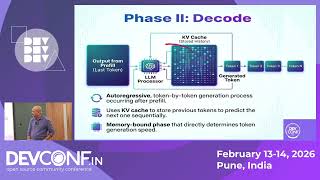
- 8:33LLM inference basics
- 11:23guideLLM performance measuring
- 17:33guideLLM benchmark demo
- 20:21Interpreting guideLLM results
- 22:48Benchmarking pitfalls and tips
- 27:23Advanced benchmarking
- 29:11Conclusion & Q&A
related talks
 27mServing PyTorch LLMs at Scale: Disaggregated Inference With Kubernetes and Llm-d
 25mvLLM: Easy, Fast, and Cheap LLM Serving for Everyone
 35mLocal LLMs on low end hardware - a practical perspective
 32mScaling Generative AI Inference with llm-d
 20mFlexLLM: Token-Level Co-Serving of LLM Inference and Finetuning with SLO Guarantees
 01h 18mOptimizing LLM Training and Inference Performance on GPUs
 23mFrom Hallucinations To Hardware: Diagnosing LLM Failures
 19mNo GPU Left Behind: Scaling Online LLM Training With...