Develop Your Own Performance Tool Integrated with Selenium
summary
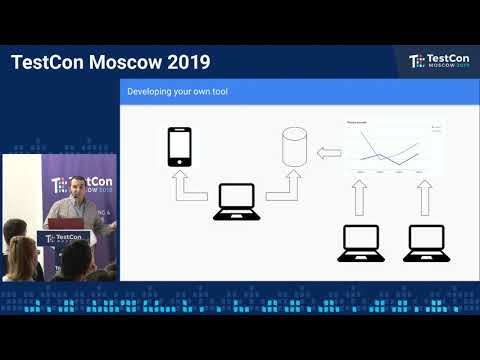
Builds an in-house performance harness that Selenium integration runs long UI loops (example: a simulated 8-hour shift) against Chrome and mobile, captures per-timestamp CPU and memory via TB ADP from Android devices, stores results in a database, and renders graphs in web app for every build and version. Implementation uses Java code threads for test execution and a separate sampler thread that executes terminal commands to extract process CPU/memory, code is shared for reuse.
AI-written summary · about
chapters (13)
- 0:00Client-side performance issues
- 1:11Manual vs automation solutions
- 3:45Pros and cons of custom tool
- 5:10Language and platform choice
- 6:17How the tool works
- 9:07Live demo of tool
- 11:20Code walkthrough
- 13:57Performance graphs from data
- 14:41Key takeaways
- 16:30Q&A on reliability
- 19:57Caching issues and adjustments
- 21:25Real-world problems solved
- 22:48Closing remarks
related talks
 32mDevelop Your Own Performance Tool Integrated with Selenium
 37mAutomated Performance Testing With WebDriver
 26mAutomated Web Performance Testing Before 5pm
 31mAutomated Performance Testing With WebDriver
 43mAutomated Performance Testing With WebDriver
 34mUsing Selenium to Improve a Team's Development Cycle
 40mAutomated Performance Testing In Preproduction
 25mAutomated Performance Testing With WebDriver