Web Accessibility - a better user experience for everyone!

summary
Practical checklist for improving web accessibility: ensure text contrast >= 4.5 using Chrome DevTools contrast inspector, use a base font size of at least 16px, maintain visible focus states and full keyboard navigation, never replace labels with placeholders and add descriptive aria-labels for ambiguous icons. Use semantic regions (header, nav, main, footer) with a single H1, provide meaningful alt text (or empty alt for decorative images), test with a Windows screen reader, and automate checks with Lighthouse, AXE, lint rules and unit/Cypress tests; examples include skip links (BBC) and Twitter accessibility settings.
AI-written summary · about
chapters (16)
- 0:00Web accessibility basics
- 2:11Accessibility principles examples
- 3:17Contrast for older users
- 5:44Text size and interactive elements
- 6:50Keyboard-only testing
- 8:17Visible focus states
- 9:00Screen reader basics
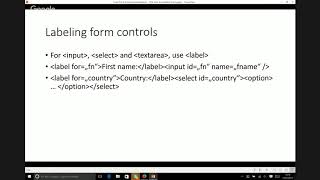
- 10:28Labeled forms over placeholders
- 11:54Descriptive links and ARIA
- 13:00Semantic HTML structure
- 14:26Image alt text
- 15:53Automated testing tools
- 16:37Benefits of accessible web
- 17:20Accessible website examples
- 18:04Skip links for quick nav
- 19:08Q&A
related talks
 48mThe Web Accessibility Basics
 45mA Web for Anyone, Anywhere, Anytime
 36mThe Human Side of Accessibility
 25mImproving Digital Accessibility and the Quality of Your Website
 48mCoding For Accessibility Best Practices from the Front Lines
 52mCommon Accessibility Pitfalls
 54mPractical tips to elevate your UX and accessibility
 01h 01mA web for anyone, anywhere, anytime