Why you’re going to FAIL running Java on docker!

summary
Java inside Docker often dies because the JVM assumes host CPUs and RAM instead of container cgroups: demos with a Spring Boot fat‑jar on OpenJDK show a container limited to 100MB or 50MB while the JVM reports ~240MB and gets OOM‑killed by the kernel. Java 8u131 / Java 9 add fixes but require experimental flags (e.g. -XX:+UnlockExperimentalVMOptions -XX:+UseCGroupMemoryLimitForHeap) or explicitly set -Xmx ≈50% of container RAM. Kubernetes restarts dead pods, kubernetes restarts but doesn't fix root cause. Use cpu‑quota/cpuset, resource limits, or the fabricate/fabric8 base image and Maven plugin to apply safe JVM settings.
AI-written summary · about
chapters (11)
- 0:00Introduction to containers
- 1:28Concepts of containerization
- 6:30History and portability
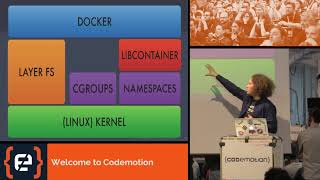
- 9:41Cgroups and namespaces
- 12:04Kubernetes overview
- 13:08Java memory issues
- 17:31Memory and CPU constraints
- 23:31Advanced resource management
- 27:58Demonstrating container failure
- 34:24Kubernetes orchestration
- 41:44Tools and concluding Q&A
related talks
 42mContainers & Java: What I wish I have been told!
 05mtalks to
 48mJava in Containers - Part Deux
 35mNO ONE PUTS Java IN THE CONTAINER
 49mJava and Containers Make it Awesome
 50mJVM and Kubernetes walk into the bar...
 01h 01mDistilling Java Containers for Kubernetes
 46mJava in a container: operational specifics